Changelogs
Stay up to date with the latest changes and enhancements.
Stay up to date with the latest changes and enhancements.

11. May 2026
Share
Salesforge 
1. Connection Notes - Free vs Premium
We’ve updated how Connection Notes work to better align with LinkedIn limits while keeping outreach smooth.
What’s changed:
Character limit increased to 300 characters (matching LinkedIn)
Applies to all users, but behavior differs by plan
Free accounts:
If the note exceeds 200 characters → it will be skipped
The system will still send the connection request without a note
Once monthly limits are reached, requests will continue without notes
Premium accounts:
Can send full 300-character notes
Notes are always included (within limits)
2. Label Mapping in HubSpot Integration
We’ve released label mapping for HubSpot, bringing it in line with our Salesforce integration.
You can now map Primebox labels directly to HubSpot fields, so your contact data stays structured and up to date in your CRM.
How it works:
Select a field via “Select HubSpot field to map”
See all Primebox labels (both predefined and custom) listed on the left
Map each label to the appropriate HubSpot field on the right
3. Forge CLI
We've released the Forge CLI, a single command line tool that lets users run the entire Forge stack (Salesforge, Primeforge, Leadsforge, Infraforge, Warmforge and Mailforge) directly from the terminal.
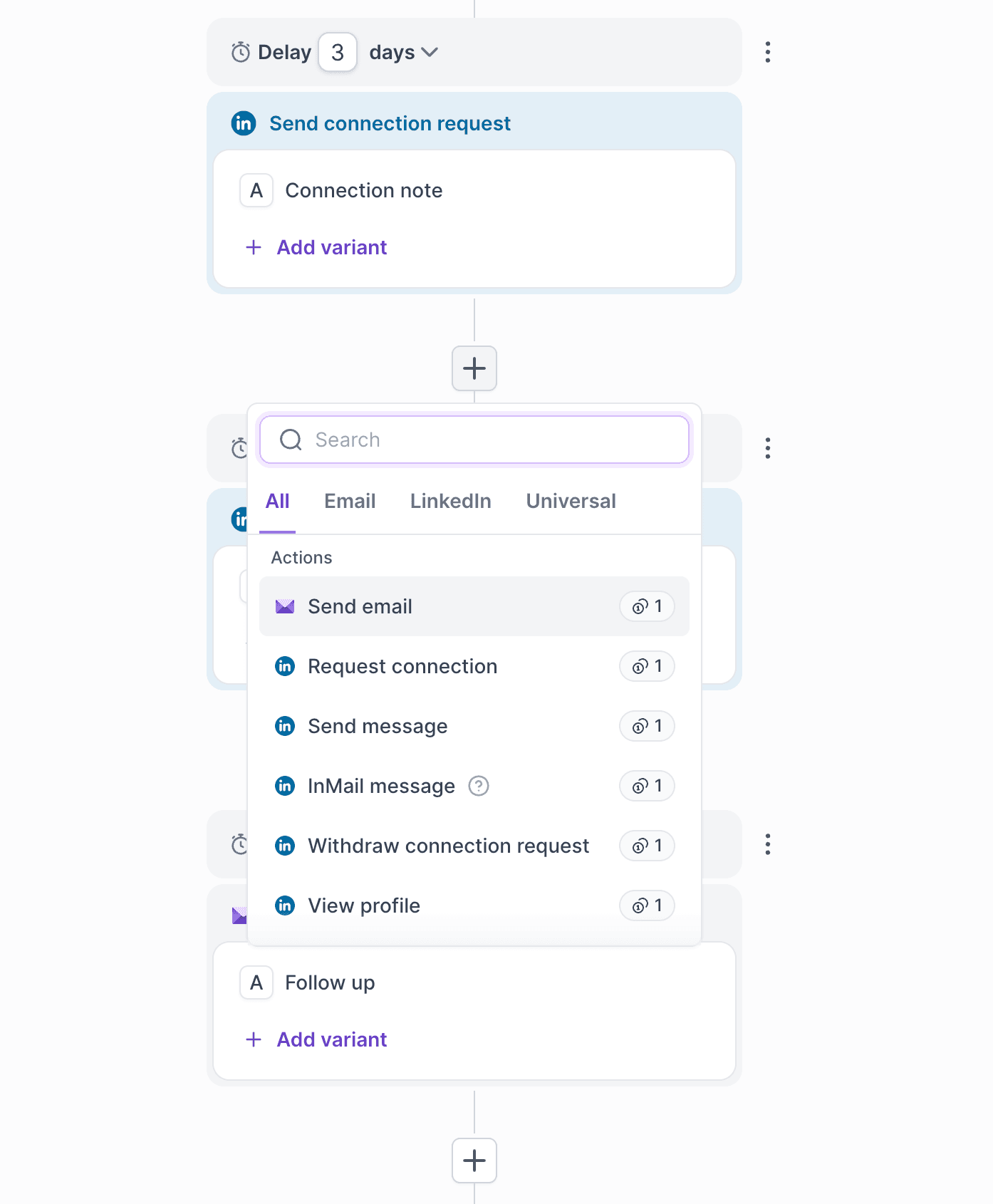
4. Insert & Remove Nodes Between Existing Steps
We’ve released a major usability upgrade for Multichannel sequence building! You can now insert and remove nodes between existing steps without rebuilding your flow from scratch.
Insert Nodes
For newly created and draft sequences, users can now insert a new node between existing ones.
How it works:
The newly inserted node automatically becomes:
The next step of the node above
The previous step of the node below
Remove Nodes
You can now remove nodes from the middle of a draft sequence without deleting everything below them.
How it works:
Removing an action node automatically reconnects the following steps
Removing a condition node keeps the YES branch and reconnects the flow
5. Bitscale Integration
We’ve released a new integration with Bitscale, similar to our existing Clay integration.
Users can now connect Bitscale with Salesforge using an API key and push data directly into Salesforge workflows.
Leadsforge 
1. Exclude List for Searches
We’ve introduced the ability to import and manage exclusion lists in Leadsforge, so you don’t pay for leads you already have.
What’s new:
New “Exclude” section in Settings
Add exclusions by:
Lead (via LinkedIn URL)
Company (via domain)
Supports both:
Bulk import (CSV)
Manual single entry
How it works:
During ICP and Lookalikes searches, any lead or company on your Exclude list will be automatically filtered out
Ensures you don’t see or pay for contacts you already have
2. Bulk Company Search via File Upload
We’ve introduced file-based bulk company search in ICP, making it easy to find leads from large lists of target companies.
What’s new:
Upload a CSV file with your company list
Map your data by selecting the “Companies” column
Best supported format: Company domain (recommended for accuracy)
Company name may work, but domain ensures better matching
How it works:
Upload 1 CSV file per search (up to 1,000 rows)
System matches companies with our database
Returns employees (contacts) from those companies
You can further refine results using standard ICP filters
Mailforge 
1. Change Mailbox Username in Mailforge
We’ve added the ability to edit mailbox usernames directly in Mailforge, reducing the need for support requests.
What’s new:
Open any existing mailbox and edit the username field
Username is now visible and editable within the mailbox view
Primeforge 
1. Update Mailbox Password via UI
We’ve added the ability to update mailbox passwords directly from the UI in Primeforge.
Previously, if a you changed your password directly in providers like Microsoft, the update wouldn’t sync automatically, which could lead to connection issues.
Cross forge (Mailforge, Primeforge, and Infraforge)
1. Domain & Mailbox Age
We’ve added Domain Age and Mailbox Age visibility across Mailforge, Primeforge, and Infraforge.
We're still working on more features & workflow improvements across all forges in May! 