Changelogs
Stay up to date with the latest changes and enhancements.
Stay up to date with the latest changes and enhancements.

Stay up to date with the latest changes and enhancements.
16. Sep 2026
Share
Bundling 
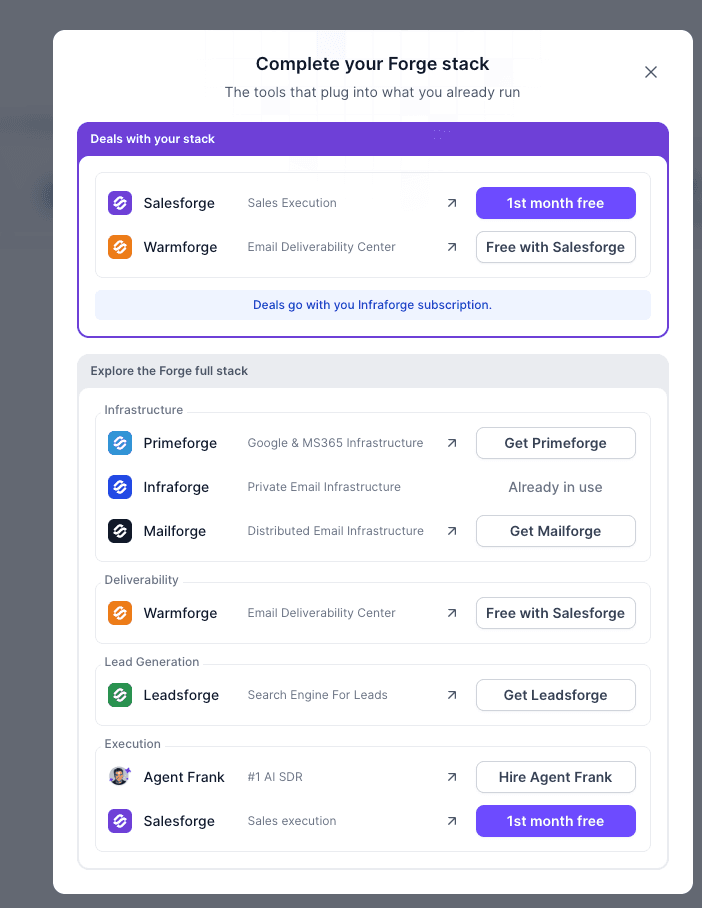
We released cross-product bundling experience across the Forge ecosystem.
Purchasing a subscription on Infraforge, Primeforge, or Mailforge you can now receive an exclusive offer to try Salesforge Growth free for 1 month.
How it works:
After purchasing an eligible infra subscription, users are shown the bundle offer
You can claim 1 month of Salesforge Growth for free
Claiming the offer takes them directly to the Salesforge checkout with the promotional pricing applied
If you already have an active Salesforge subscription won’t see the Salesforge offer
The offer is the same regardless of the size of the infra subscription
This is our first step toward making the different Forge products work together as a more connected ecosystem and giving customers a reason to expand into other products in the stack.
Mailforge 
1. Mailbox Analytics in Mailforge
We’ve released Mailbox Analytics in Mailforge, giving you detailed visibility into mailbox activity and recipient engagement directly inside the platform.
Open any mailbox from the actions menu to access detailed analytics, including:
Emails sent & received
Reply rate
Email activity over time
Most contacted recipients
Contact frequency and share of total sends
Top recipient domains
Recipient-level last sent activity
You can analyze performance across 24h, 7d, 30d, 1 year, or all time, with all metrics and charts updating based on the selected period.
This brings the mailbox-level visibility we recently introduced in Primeforge to Mailforge, making it much easier to understand sending activity and who your mailboxes are reaching!
We're still working on more features & workflow improvements across all forges in September! 
07. Sep 2026
Share
Salesforge 
1. Send Now for Multichannel Sequences
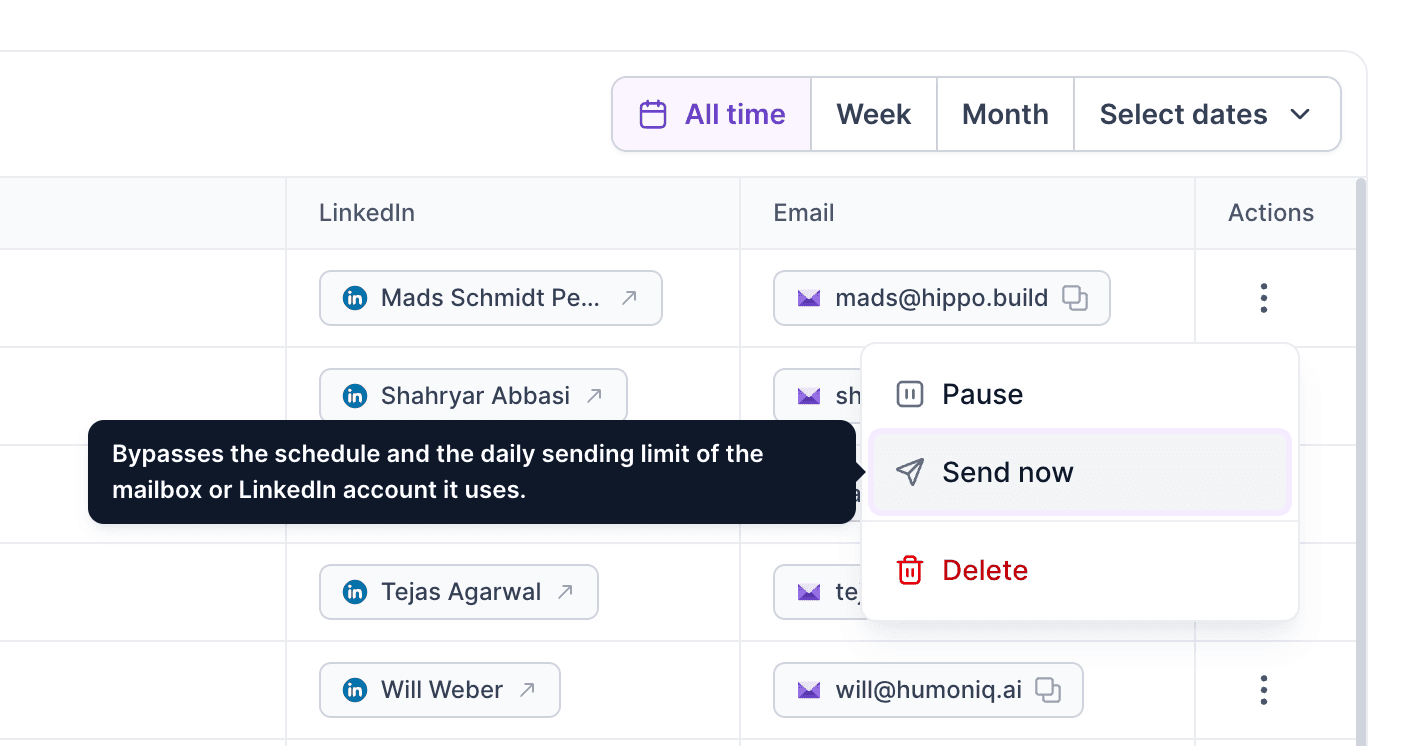
We’ve released Send Now for Multichannel sequences, giving you more control over individual contacts without changing the sequence for everyone else.
From the Contacts view inside an active sequence, you can now manually trigger a scheduled action for a specific contact instead of waiting for its normal execution time.
How it works:
Available at the contact level for active sequences
Works with both email and LinkedIn actions
Only available for actions that are currently scheduled and eligible to run
Sequence conditions are still respected, e.g. reply status, connection accepted, email/LinkedIn availability, bounce status, connection status, etc.
Once Send Now is requested, it can’t be triggered again for the same action while the previous request is still pending
This is useful when you want to move a particular prospect forward immediately without changing the timing or setup of the rest of your sequence!
We're still working on more features & workflow improvements across all forges in September!
31. Aug 2026
Share
Agent Frank 
1. Signals in Agent Frank
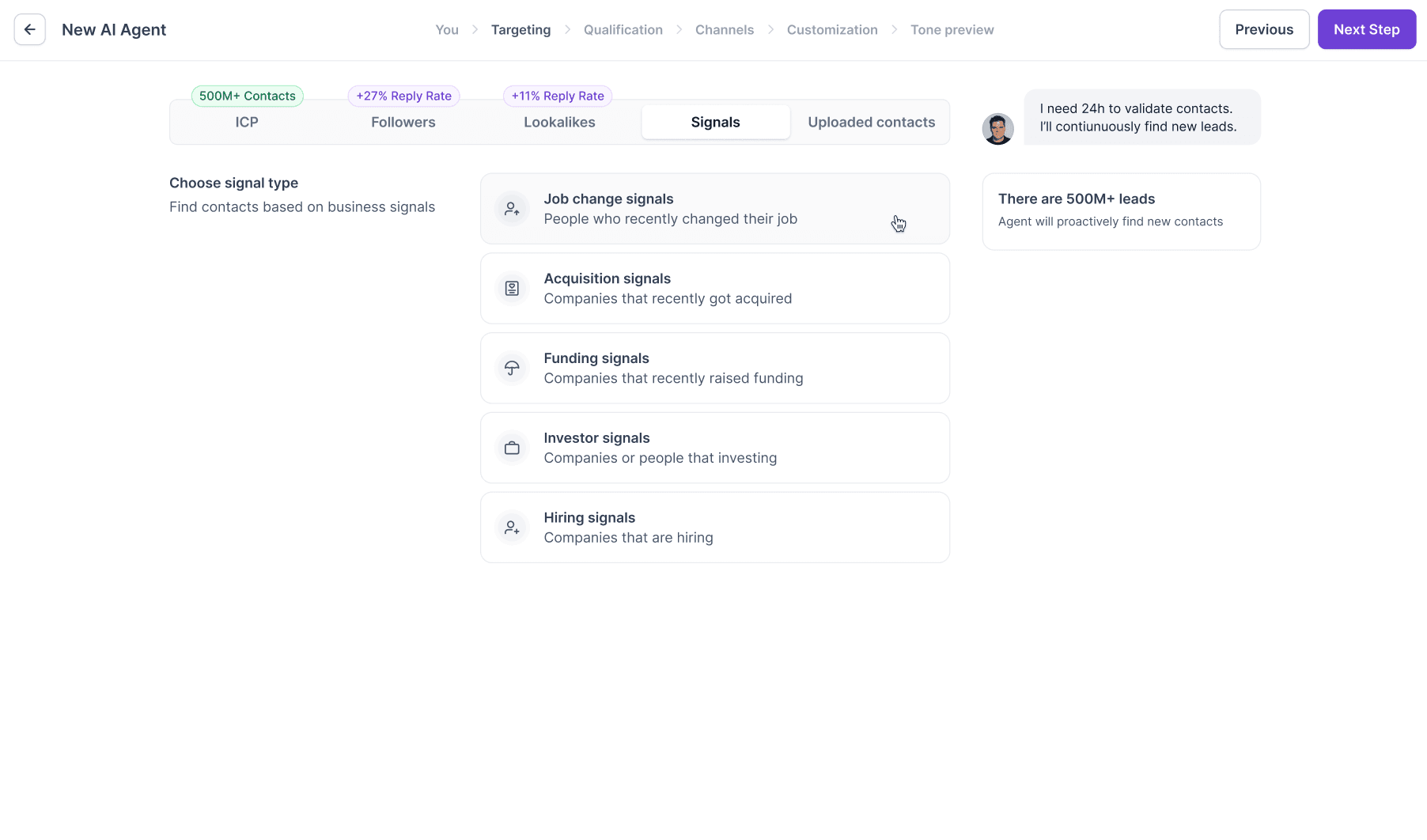
We’ve released Signals in Agent Frank, giving you a new way to build highly targeted prospect lists based on real-world company and contact events.
Alongside Lookalikes and Uploaded Contacts, you can now choose a Signal as your prospecting source and refine it with additional filters.
Available signals include:
Acquisitions
Funding
Investors
Hiring
Job changes
Depending on the signal, Agent Frank also lets you add extra ICP filters for better targeting, including:
Job titles
Contact location
Company HQ / office location
Industries
Technologies
The additional filtering happens seamlessly in the background, so you can combine signal data with Leadsforge targeting without worrying about where each filter comes from!
Chrome extension 
1. Faster & More Reliable Enrichment
We’ve released a major refactor of Chrome Extension enrichment, improving reliability for both single and bulk enrichment jobs.
What’s improved:
More reliable email and phone enrichment
Better handling of large bulk enrichment jobs
Bulk enrichments now run asynchronously, reducing timeout issues
Clear loading and progress states while enrichment is running
Enrichment progress is visible directly in Leadsforge
Notifications link you straight to the relevant Chrome Extension enrichment list
Completed enrichments and credit usage are correctly reflected in Enrichment History
Successfully enriched leads are automatically added to the “Chrome extension” list
Overall, Chrome Extension enrichment should now feel much smoother and be significantly more reliable, especially when working with larger lead lists!
Leadsforge 
1. Qualification-Based Filtering in Leadsforge
We’ve released qualification-based filtering, making it easier to act only on leads that match your qualification criteria.
You can now filter any enriched list by the result of each qualification criterion:
Positive
Negative
Not sure
Multiple verdicts within the same criterion use OR logic, while filters across different criteria use AND logic. Contacts without a result for the selected criterion are excluded.
Qualification filters are supported for:
Enrichment
CSV export
Salesforge export
Salesforce export
HubSpot export
Bulk delete
This means you can qualify a large list first, then enrich or export only the leads that actually meet your criteria helping reduce unnecessary enrichment spend!
We're still working on more features & workflow improvements across all forges in September!
25. Aug 2026
Share
Primeforge 
1. Mailbox Analytics in Primeforge
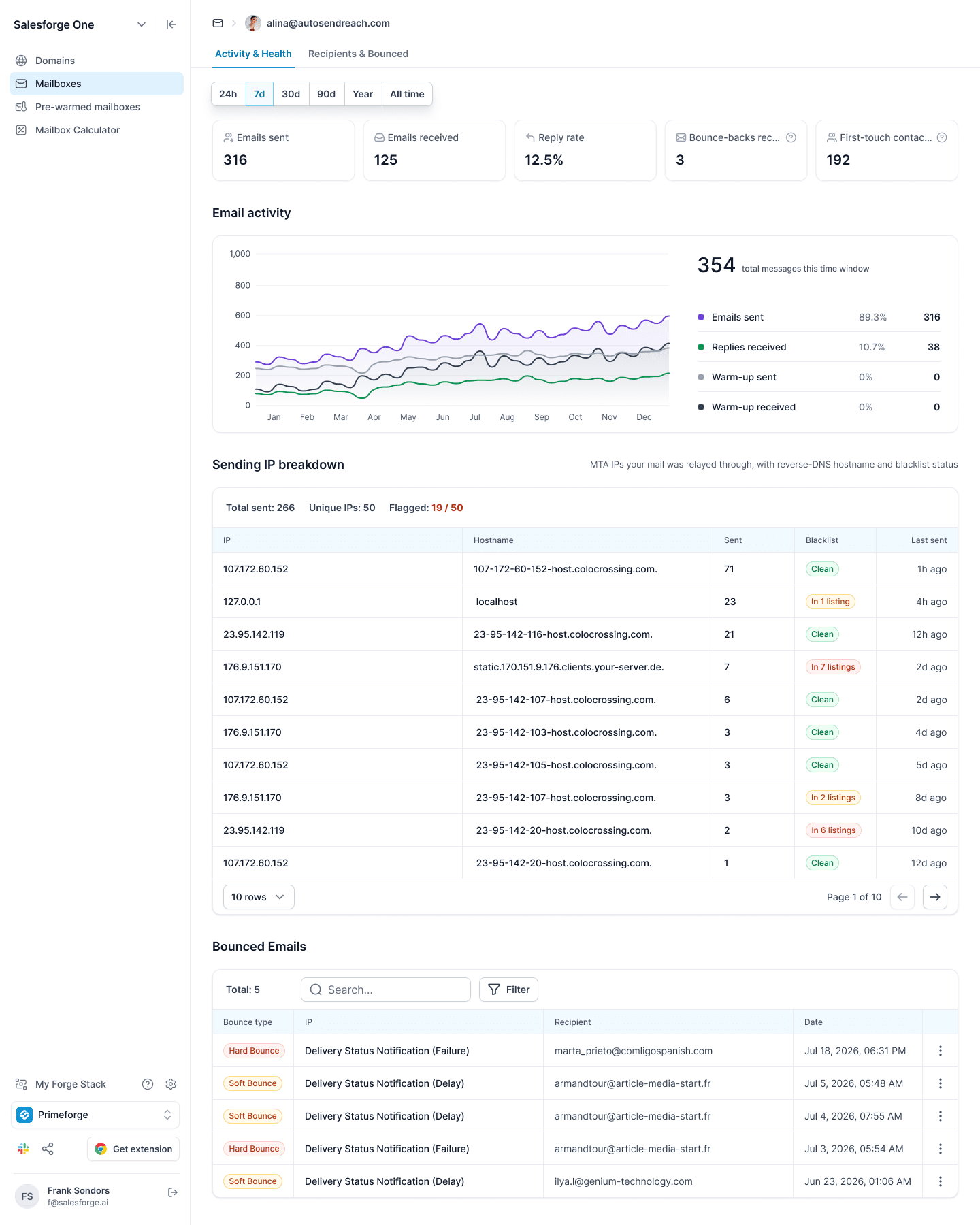
We’ve released Mailbox Analytics in Primeforge, giving you a detailed view of mailbox performance, sending health, bounces, and recipient activity directly inside Primeforge.
What’s new
Open any mailbox to access two new analytics views:
Activity & Health
Emails sent
Emails received
Reply rate
Bounce-backs received
First-touch contacts
Email activity over time, including sent emails, replies, and warm-up activity
Sending IP breakdown with hostname, sending volume, blacklist status, and last activity
Bounced Emails with hard/soft bounce classification, search, and filtering
Open any bounce to see detailed delivery information, including the cause, enhanced status, reporting MTA, message ID, and original DSN response
Recipients & Bounced
Unique recipients
Sends to prospects
Average sends per prospect
Top-domain share
Breakdown of your prospects by email provider/ESP, including Microsoft 365, Google Workspace, consumer providers, and self-hosted mail servers
Reply rates by provider
Most contacted recipients
Top recipient domains
You can also switch between 24h, 7d, 30d, 90d, Year, and All time to analyze mailbox performance across different periods.
This gives you a much clearer picture of how each mailbox is being used, who you’re sending to, where mail is being routed, and where deliverability issues are happening!
Salesforge
1. Multichannel Webhooks
We've expanded Multichannel webhooks to cover more LinkedIn actions.
New webhook triggers are now available for:
LinkedIn message sent
LinkedIn InMail sent
LinkedIn connection request sent
LinkedIn connection request accepted
LinkedIn connection request withdrawn
LinkedIn profile viewed
LinkedIn post liked
LinkedIn contact followed
LinkedIn replied: covering replies to InMails, messages, and connection requests
Users can now create and access these webhooks programmatically and connect Multichannel activity with their own systems and workflows!
Leadsforge
1. Enrichment History in Leadsforge
We’ve released a new Enrichment History breakdown in Leadsforge, giving you clearer visibility into how enrichment credits are being used across your lists.
Previously, the Enriched view only showed cumulative totals. Now, every enrichment is stored as a separate run, so you can see exactly what happened each time.
For each enrichment run, you can now see:
Who started the enrichment
When it was run
Status of the run
Contacts processed
Enrichment channels used
Credits consumed
Multiple enrichment runs on the same list are kept separately, with the newest shown first, while the list-level summary shows total runs, total credits used, and the latest enrichment activity.
We’ve also improved transparency around re-enrichment: if a contact already has the requested data, it’s skipped and you won’t be charged for it again.
We're still working on more features & workflow improvements across all forges in August! 
17. Aug 2026
Share
Mailforge
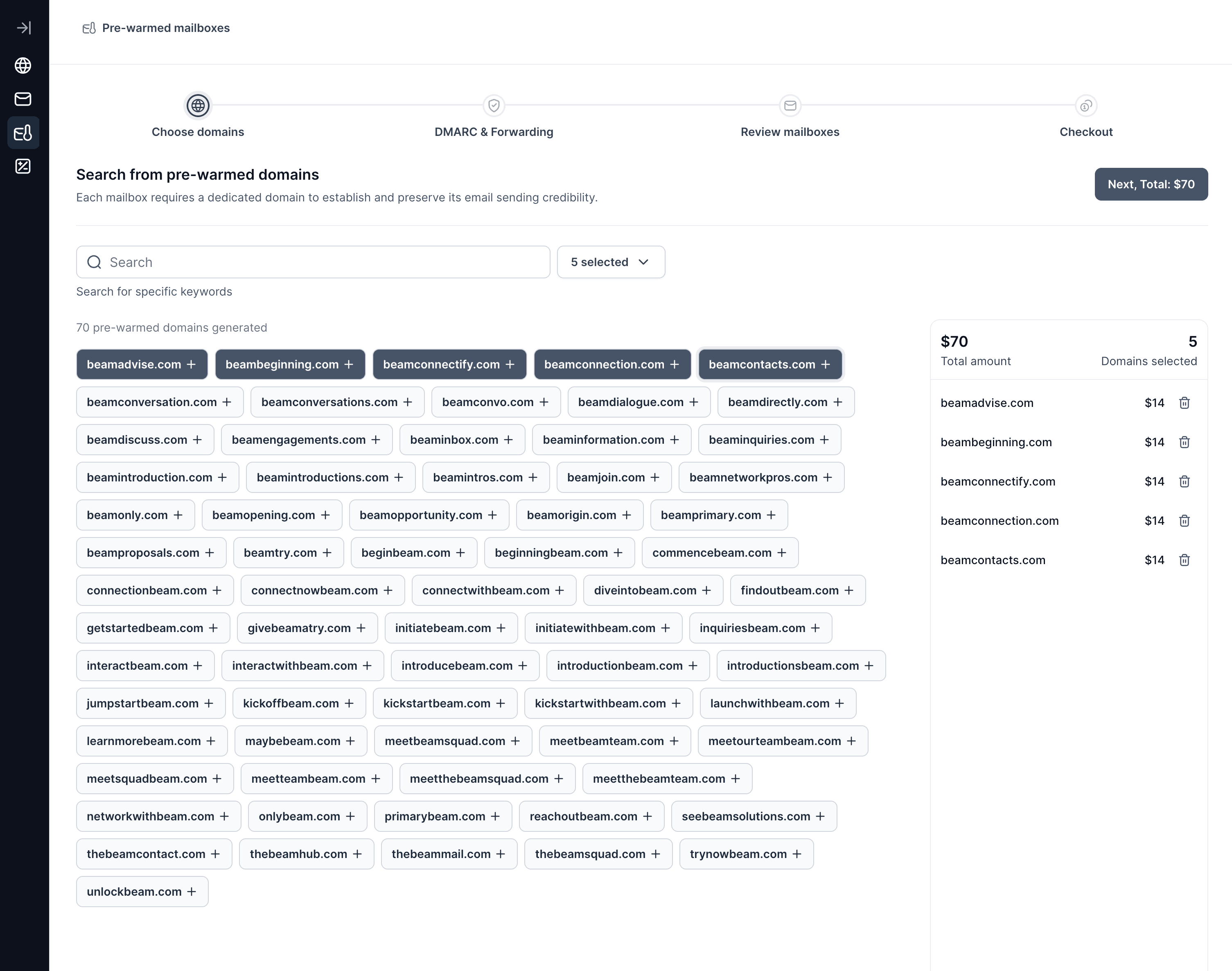
1. Pre-Warmed Domains in Mailforge
We've introduced Pre-Warmed Domains in Mailforge, bringing the same functionality already available in Infraforge and Primeforge.
You can now:
Purchase pre-warmed domains directly through Mailforge
Purchase and manage pre-warmed domains via Mailforge Public API
Get your email infrastructure ready for outreach faster without starting the warm-up process from scratch!
Salesforge
1. Subscription Renewal Improvements
We’ve improved how subscription renewals are handled when Chargebee processes recurring payments.
What’s changed:
Recurring plan renewals now correctly refresh and assign the new period’s Salesforge credits.
Annual subscriptions now receive their full year of renewable credits upfront, instead of credits being reset month by month.
Social Credits add-on renewals are handled consistently with other SF credits.
LinkedIn and multichannel features are now automatically re-enabled on subscription renewal when included in the customer’s plan.
2. Live Updates in Primebox
Primebox now updates in real time without relying on polling. Thread lists and open conversations automatically refresh when new activity happens.
Live updates cover:
New incoming emails and LinkedIn messages
Sent replies and forwards
Read/unread status changes
Label updates
Deleted threads
Automatic recovery when events are missed
Real-time updates across tabs and users: changes made to a thread in another browser tab or by another user are reflected instantly
3. Emoji Picker in Primebox
We've added an emoji picker to Primebox for both email and LinkedIn messages. You can now easily add emojis to your messages directly from the editor!
4. LinkedIn account connection improvement
We’ve released an improvement to the LinkedIn account connection flow.
When LinkedIn requires in-app validation, users can sometimes get stuck because the approval notification never appears in the LinkedIn app. Users can now select “Try another way” and authenticate using a verification code instead.
This fallback is available for both:
Regular LinkedIn account connections
Magic-link connection flows
5. Smarter LinkedIn sender selection
We’ve released an improvement to how Primebox selects the sender when replying to LinkedIn conversations with multiple sender profiles.
Previously, Primebox could default to a different sender that had participated earlier in the conversation. Now, when you click Reply, Primebox will automatically select the sender who most recently messaged the prospect before that reply, matching the LinkedIn channel.
This should make replying from multi-sender LinkedIn threads more intuitive and reduce the chance of responding from the wrong profile.
We're still working on more features & workflow improvements across all forges in August!
10. Aug 2026
Share
Agent Frank
1. Agent Frank Intelligence Layer
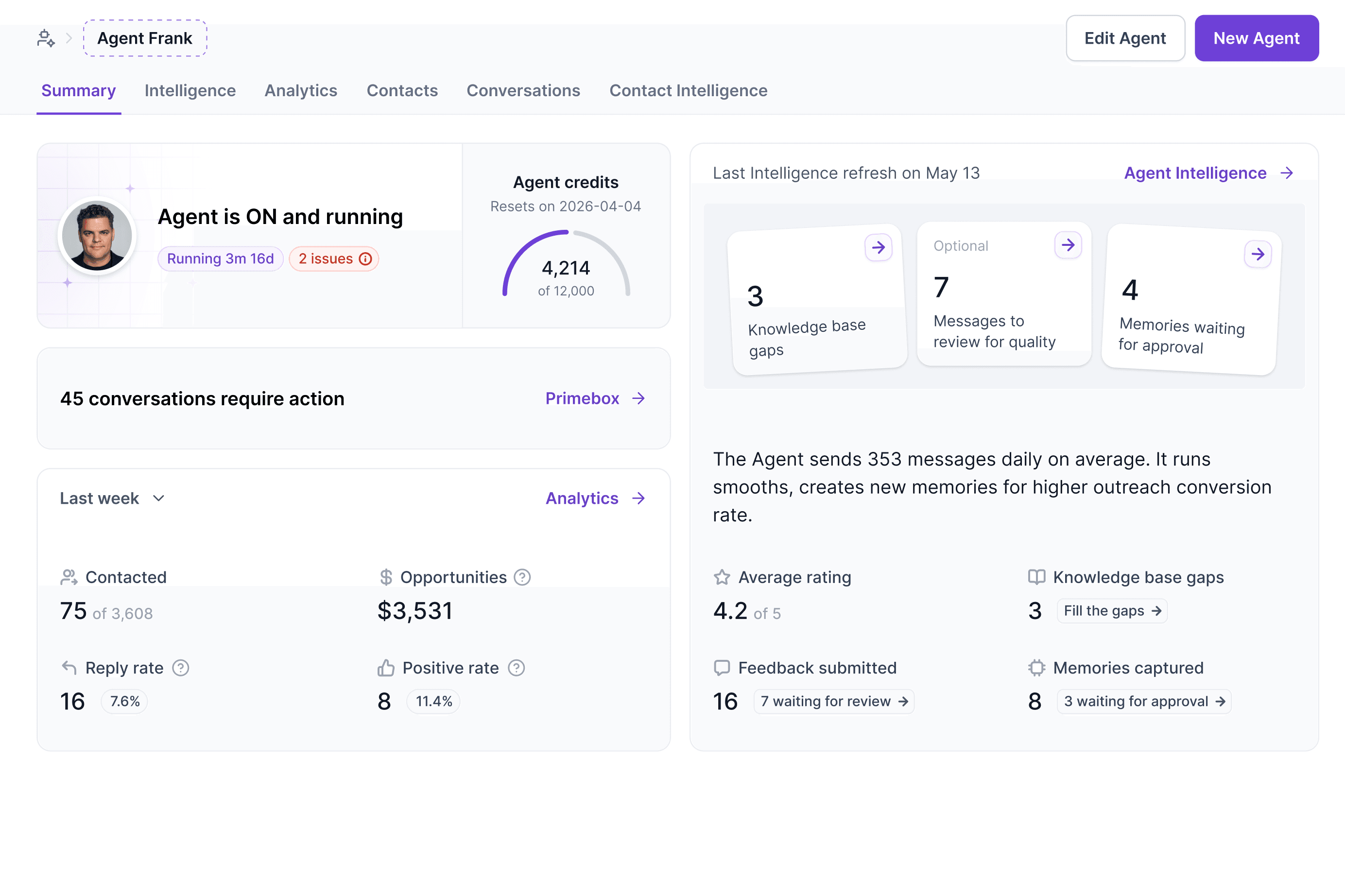
We've introduced Agent Intelligence a new learning layer that helps Agent Frank continuously improve outreach quality, personalize messaging, and keep you in control.
Intelligence Tab
A new Intelligence tab gives you visibility into how your agent is learning and evolving.
Key capabilities:
Agent status showing whether the agent is Learning, Growing, or Mature, along with its current trend.
Review Queue with recently generated outbound messages, allowing you to rate AI-generated content and provide feedback. Feedback includes ratings, issue tags, and mandatory notes, ensuring the AI learns from meaningful context.
Memories that influence future message generation.
Create your own memories manually.
Review system-suggested memories and choose to Keep or Remove them.
High-confidence memories are automatically approved, while lower-confidence suggestions wait for your review.
Contact Intelligence
Every contact now receives AI-powered research before outreach begins.
For each lead, Agent Frank researches:
The person and their company
Buying signals and timing
Likely pain points and objections
A recommended outreach strategy
You can open the Lead Intelligence view to review the research generated for each contact. If research cannot be completed, the system automatically retries in the background.
Contact-Level Feedback
The Contacts tab now includes the same feedback experience as the Review Queue, allowing you to rate individual AI-generated messages directly from a contact's sequence progression.
Each contact also has a dedicated Lead Intelligence view for reviewing the research used during message generation.
Human Review
When Agent Frank detects a reply that requires human judgment such as pricing requests, document requests, or scheduling it places the draft into Human Review instead of sending it automatically.
Alongside the draft, you'll now see an explanation of why your review is required, helping you quickly understand what needs your attention.
With Agent Intelligence, Agent Frank doesn't just automate outreach it continuously learns from your feedback, researches every prospect before messaging, and improves over time to generate better, more personalized conversations!
Salesforge
1. Improved contact enrollment across sequences
We’ve rolled out a more flexible way to add contacts who are already enrolled in other sequences.
When adding contacts to a sequence, Salesforge now checks their existing enrollments first and, when needed, gives you a simple choice:
Skip: add only contacts that can be enrolled without changing their existing sequence progress.
Move: move eligible contacts into the new sequence, automatically stopping their future outreach in the previous sequence where necessary.
Leadsforge
1. Synchronous Enrichment API for Leadsforge
We've introduced a new Synchronous Enrichment API, enabling real-time email and phone enrichment with significantly faster response times.
Two new endpoints are now available:
/enrichment/email
/enrichment/phone
Unlike the existing asynchronous enrichment API, these endpoints are optimized for single-record lookups, making them ideal for real-time applications and integrations.
You can enrich a contact using any of the following:
Person ID
LinkedIn URL
Full name + company
Built for Speed
To deliver fast, reliable responses, the synchronous API uses a curated waterfall of our fastest enrichment providers, selected based on low latency and high rate limits.
We're still working on more features & workflow improvements across all forges in August!
03. Aug 2026
Share
Salesforge
1. Salesforge API Documentation Is Live
Instead of navigating raw Swagger endpoints, developers now have access to a modern, dedicated documentation portal with everything needed to build on top of Salesforge.
Improvements include:
Comprehensive, developer-friendly API documentation
Better endpoint organization and navigation
Authentication guides and integration examples
Faster onboarding for building custom integrations and automations
Continuously updated documentation alongside new API releases
Explore the new documentation here:
https://developer.salesforge.ai/
2. Additional Filters on the Contacts Page
We've expanded the Contacts page with new filtering options, making it easier to segment, manage, and analyze your contacts.
New filters include:
Company: Filter contacts by company, with search support.
Sequence: Filter by one or multiple sequences.
Exclude by Sequence: Exclude contacts that belong to selected sequences.
Sequence Status: Available only when a single sequence is selected, allowing you to filter contacts who have different sequence statuses.
Primebox Labels: Available only when Sequence Status = Replied, letting you further refine replied contacts by their Primebox labels.
We've also extended existing filters fully support Multichannel Sequences:
Last Contacted
Exclude Contacted
Leadsforge
1. Local Companies Search in Leadsforge
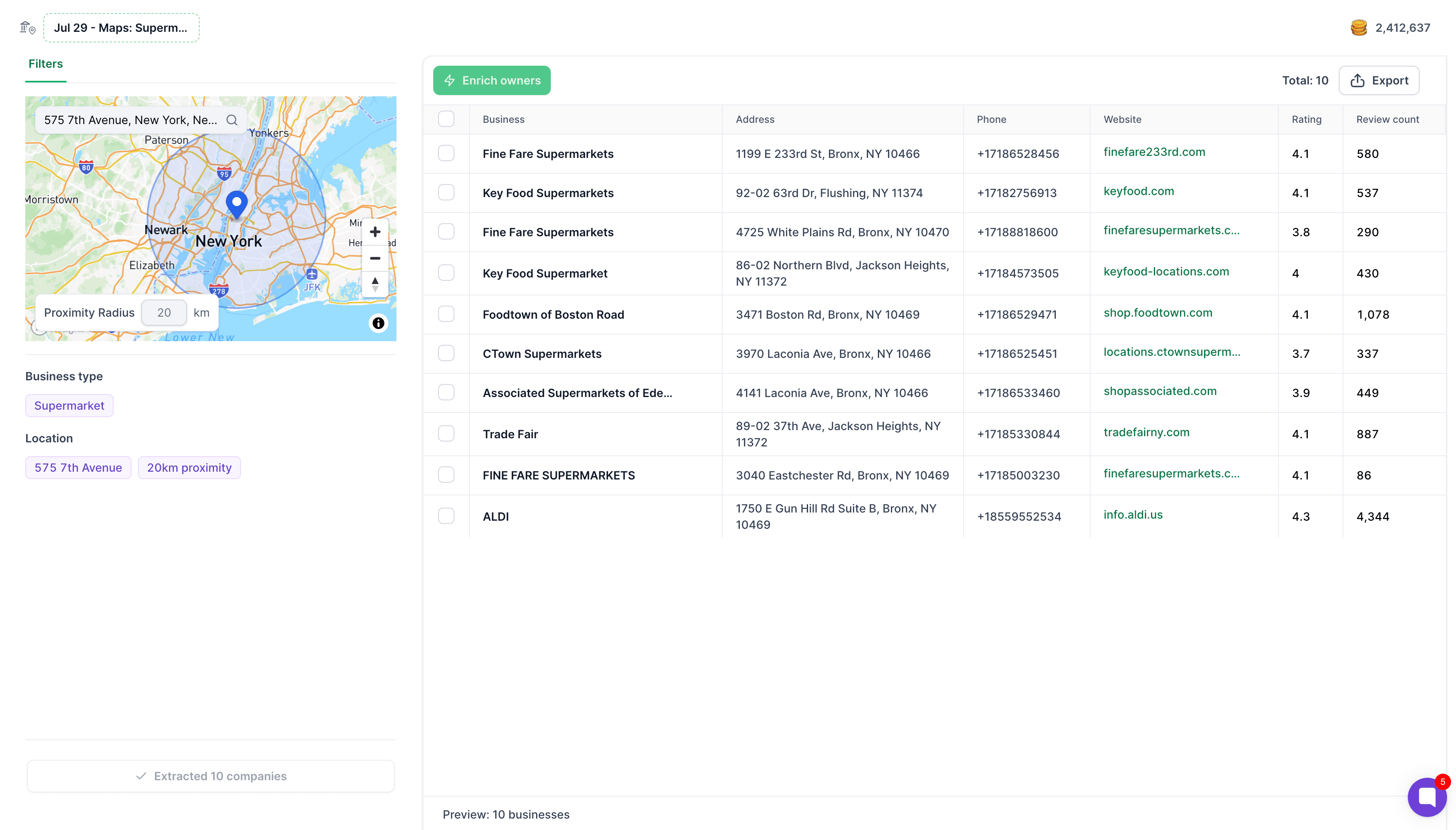
We've introduced Local Companies Search, a new sourcing path in Leadsforge that lets you discover businesses based on their location and business type.
Powered by data from Google Maps, you can now build highly targeted local prospect lists in just a few clicks.
How it works:
Set a location and define a search radius.
Search for businesses by type (e.g. dentists, restaurants, marketing agencies, law firms, and more).
Extract matching businesses or enrich them further to find the right contacts.
Export your lists either immediately after extraction or after enrichment.
This makes Leadsforge a powerful tool for local prospecting, helping you quickly identify and engage businesses in any geographic area!
We're still working on more features & workflow improvements across all forges in August!
27. Jul 2026
Share
Warmforge 
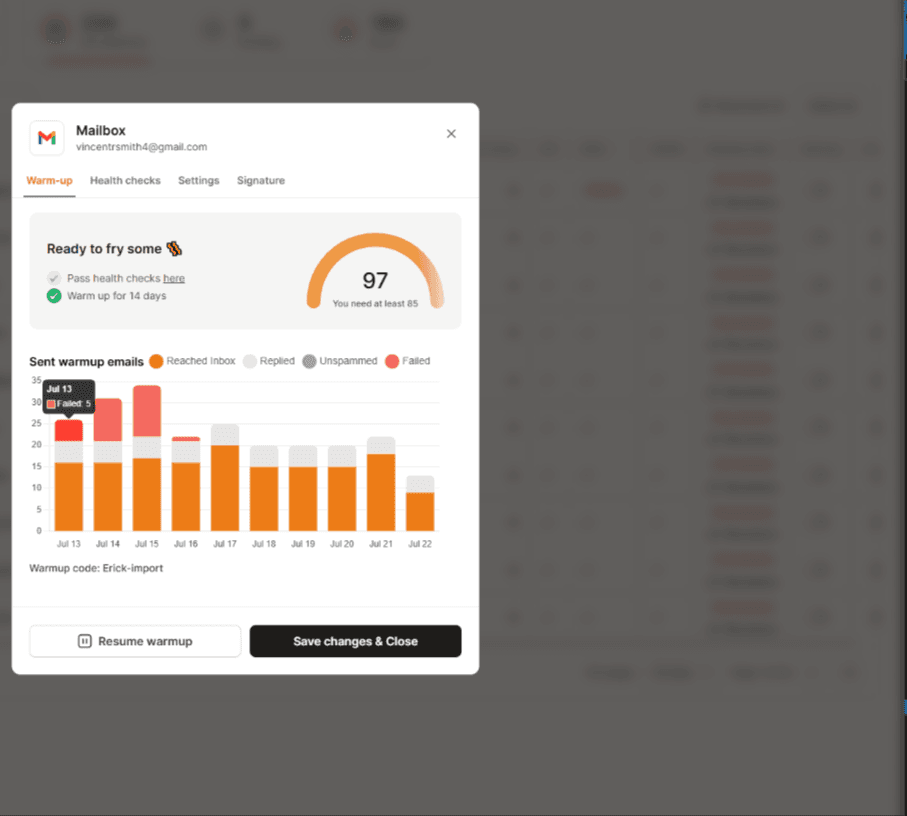
We've improved Warmforge mailbox analytics by introducing Failed Count and Failure Reason indicators, making it much easier to identify delivery issues.
What's new:
Added a Failed column to the mailbox table, showing how many emails failed to send
Added Failed Count to each mailbox's statistics
Hovering over the failed count reveals the latest failure reason, helping you quickly understand why emails weren't sent.
We're still working on more features & workflow improvements across all forges in August!
20. Jul 2026
Share
Salesforge
1. Improved Sender Profile Disconnection Flow
We've improved how LinkedIn sender profiles are disconnected, making it easier to temporarily remove and reconnect accounts without losing history.
Previously, disconnecting a LinkedIn account effectively deleted it, meaning reconnecting created a new sender. This could interrupt active outreach, break Primebox conversations, and lose the sender's association with previous campaigns.
What's changed:
You can now disconnect a LinkedIn account directly from the UI without deleting it.
Disconnected accounts remain in a Reconnect state, preserving all outreach history and Primebox conversations.
Reconnecting the account (using the same email) reuses the existing sender, allowing campaigns and replies to continue.
LinkedIn accounts can now only be permanently removed by deleting the entire sender profile.
Leadsforge
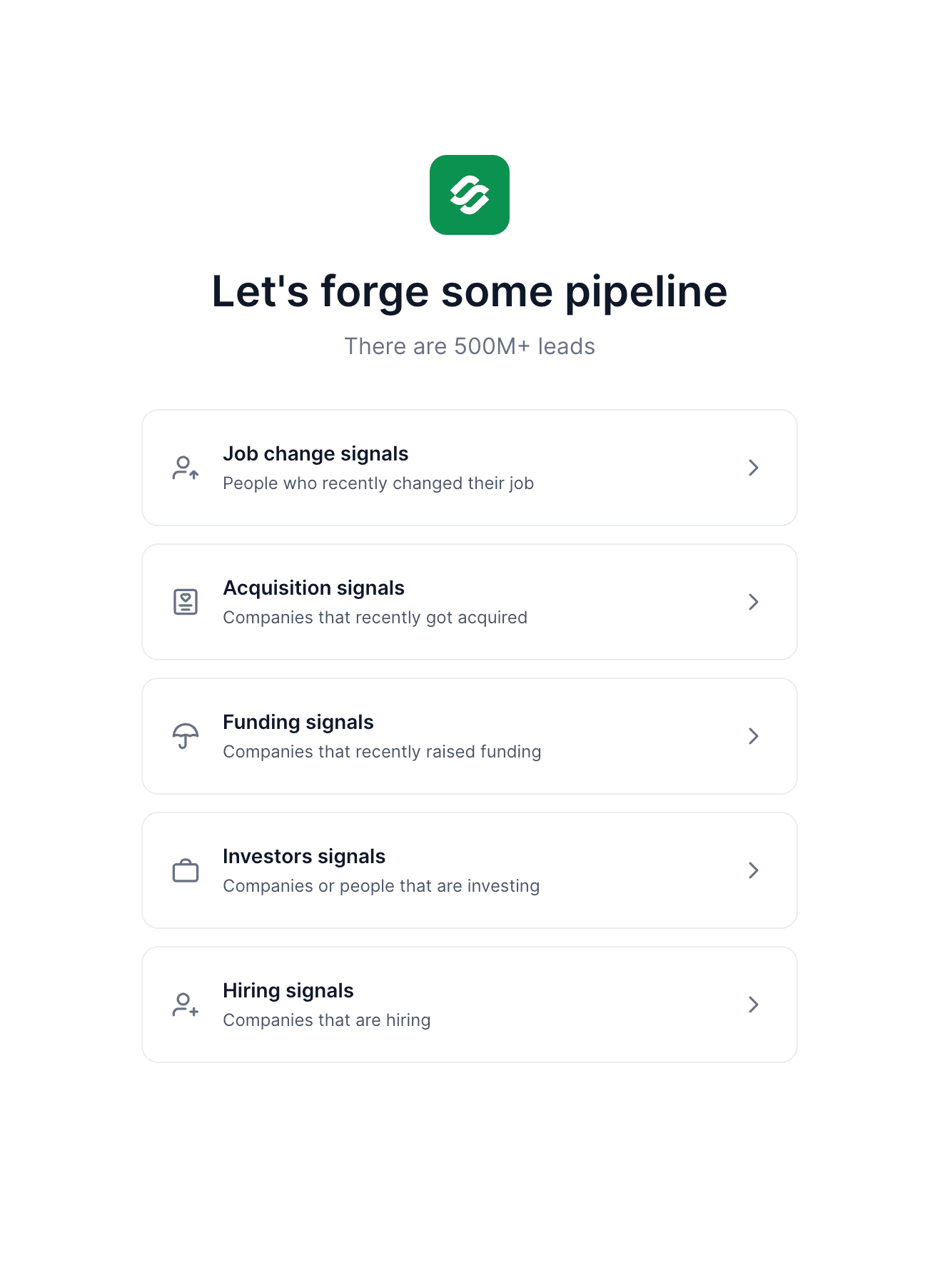
1. Hiring Signals for Leadsforge
We've introduced Hiring Signals as a new sourcing path in Leadsforge, helping you find companies that are actively hiring and discover the right people to contact inside those companies.
After selecting your filters, Leadsforge matches hiring companies with our database and returns the employees from those companies, allowing you to further narrow your search using Leadsforge's existing filters (for example, by job title or department).
Hiring Signals are available for companies in the United States, with support for additional countries and regions coming soon!
Agent Frank
1. Agent Frank Channel Setup Redesign & Domain Preview
We've redesigned the Channels step in Agent Frank onboarding to make setup faster and more intuitive. The new flow simplifies sender configuration and introduces a Domain Preview, allowing you to review and choose the domains you'd like to use before purchasing.
What's new:
Domain Preview lets you browse and select domains before completing your setup.
The empty state now highlights Megaforge as the recommended option for purchasing mailboxes.
Creating a sender profile now requires connecting a LinkedIn account and providing a profile name.
Existing sender profiles are displayed, allowing you to quickly select and reuse them.
If you already have mailboxes, you can assign them to senders through a dedicated mailbox picker.
Every sender must have at least one mailbox assigned.
When purchasing through Megaforge, mailboxes are automatically distributed and assigned to your sender profiles.
We're still working on more features & workflow improvements across all forges in July!
14. Jul 2026
Share
Salesforge
1. Improved Lead Progress Visibility
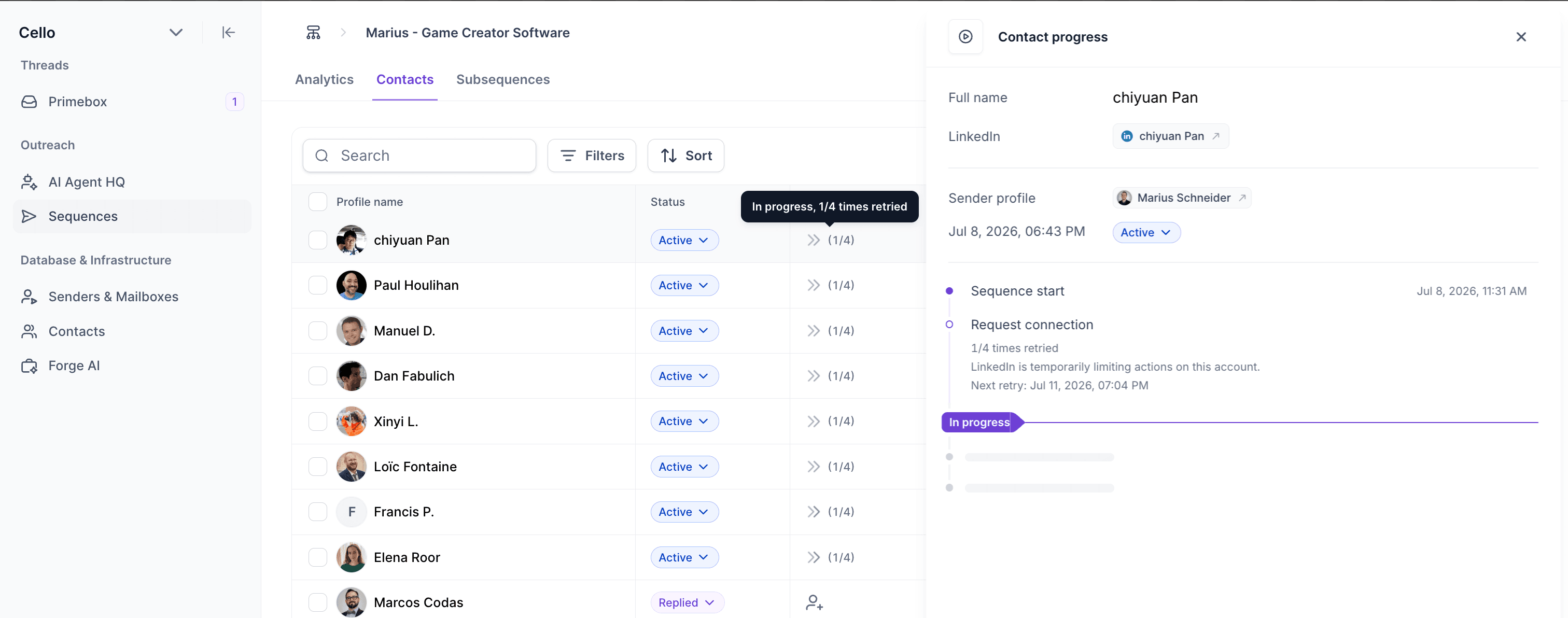
We've improved Lead Progress in Multichannel Sequences to give you better insight into what each contact is doing and when issues occur.
What's New
Retry status is now displayed in both the Contacts table and the Lead Progress modal, making it clear when a step is being automatically retried due to temporary issues (such as LinkedIn rate limits or email provider outages).
The current step is now highlighted in the Lead Progress modal, so you can instantly see where a contact is in the sequence.
If a step fails, the failed node is shown directly in the Lead Progress modal, making troubleshooting much easier.
2. Email Validation Status Condition for Multichannel Sequences
We've added a new Email Validation Status condition to the Multichannel Sequence builder, allowing you to route contacts based on the quality of their email addresses. To use this condition, simply add it to your sequence and run email validation when adding contacts to the sequence.
By default, the following statuses are considered valid:
Safe
Catch-all
Role account
How it works:
If a contact's email validation status matches one of the selected statuses, they follow the Yes branch.
If it doesn't match or if the contact has not been validated they automatically follow the No branch.
Primeforge
1. Email forwarding for MS365 mailboxes.
Forwarding is now available for MS365 mailboxes just like for Google ones
Agent Frank
1. Leadsforge-Powered ICP Setup for Agent Frank
We've redesigned the Targeting step in Agent Frank onboarding by bringing the Leadsforge search experience directly into the ICP setup.
You can now:
Browse potential leads using the familiar Leadsforge interface with filters and a searchable results table
Open LinkedIn profiles directly from the results
Expand your search to discover more matching leads
Remove leads you don't want to target, deleted leads are automatically added to your Do Not Search list in Leadsforge, preventing them from appearing in future enrichment searches.
Chrome Extension
1. Chrome Extension Now Uses the Full-Height Side Panel
We've redesigned the Salesforge Chrome Extension to take advantage of Chrome's native Side Panel, providing a larger, more responsive workspace.
We're still working on more features & workflow improvements across all forges in July!