Changelogs
Stay up to date with the latest changes and enhancements.
Stay up to date with the latest changes and enhancements.

22. Jun 2026
Share
Salesforge 
1. Localized Greeting Variable for Human Path
We’ve brought Localized Greeting to the Human Path in Multichannel sequences, giving users the same personalization capabilities available in Agent Frank.
How It Works:
A new variable is now available in the personalization picker: {{localized_greeting}}
When inserted into a message, the variable dynamically generates a greeting appropriate to the recipient's language and locale.
Examples may include: (Hello, Hi, Bonjour, Hola, Guten Tag) depending on the contact's language and location.
Cost: 1 personalization credit per sent message that uses {{localized_greeting}}
2. Autospintax Improvements
We've released a major upgrade to Autospintax in Multichannel Sequences, focused on improving email quality, reducing spam risk, and giving users more control over generated variations
The generation logic has been improved to produce safer and more natural variations:
Spam words are no longer intentionally introduced into generated spintax variations
Generated wording is more natural and grammatically correct
Variation quality has been improved while maintaining the original message intent
Spam scores remain significantly lower in most generated outputs
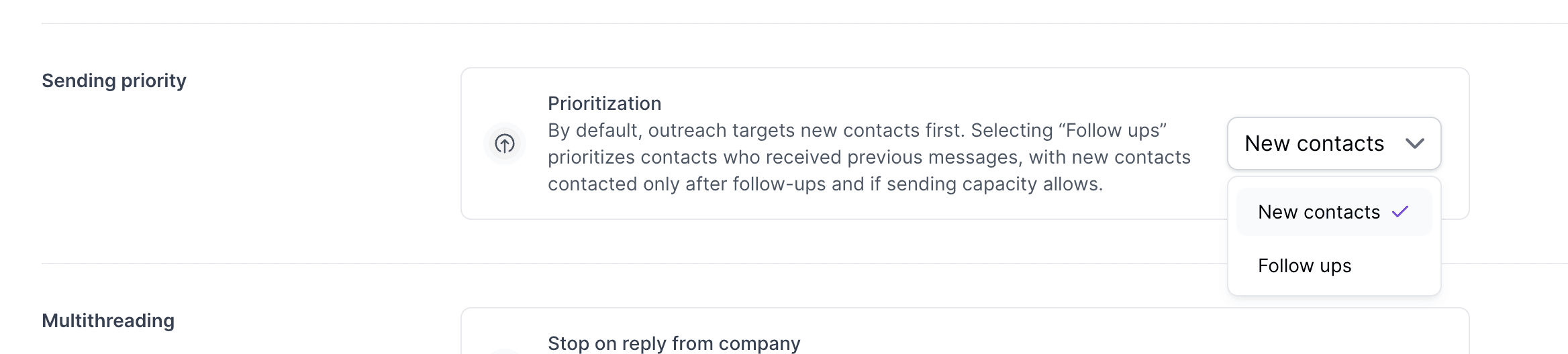
3. Prioritize Follow-Ups vs New Contacts
We've released a new Prioritization setting for Multichannel Sequences, giving users control over whether sending capacity should be allocated to follow-ups or new contacts first, available both for Email and LinkedIn outreach!
Available Options:
New Contacts (Default)
Prioritizes first-touch outreach
New leads are contacted before follow-ups
Existing sequence behavior remains unchanged
Follow Ups
Prioritizes contacts already in the sequence
Follow-up messages are sent before new outreach
New contacts are only contacted after follow-ups have been scheduled and capacity remains available
Leadsforge 
1. List Rename & Name Synchronization
We've released the ability to rename lists in Leadsforge, making it easier to organize and manage lists.
Rename Lists
You can now:
Edit existing list names both Search lists and Enriched lists
Rename lists at any time from: Sidebar, Enriched page, Results page
Keep naming consistent with campaigns, ICPs, or customer projects
Renaming a Search list automatically updates the corresponding Enriched list
Renaming an Enriched list automatically updates the corresponding Search list
We're still working on more features & workflow improvements across all forges in June! 