
Aug 25, 2026
Primeforge 
1. Mailbox Analytics in Primeforge
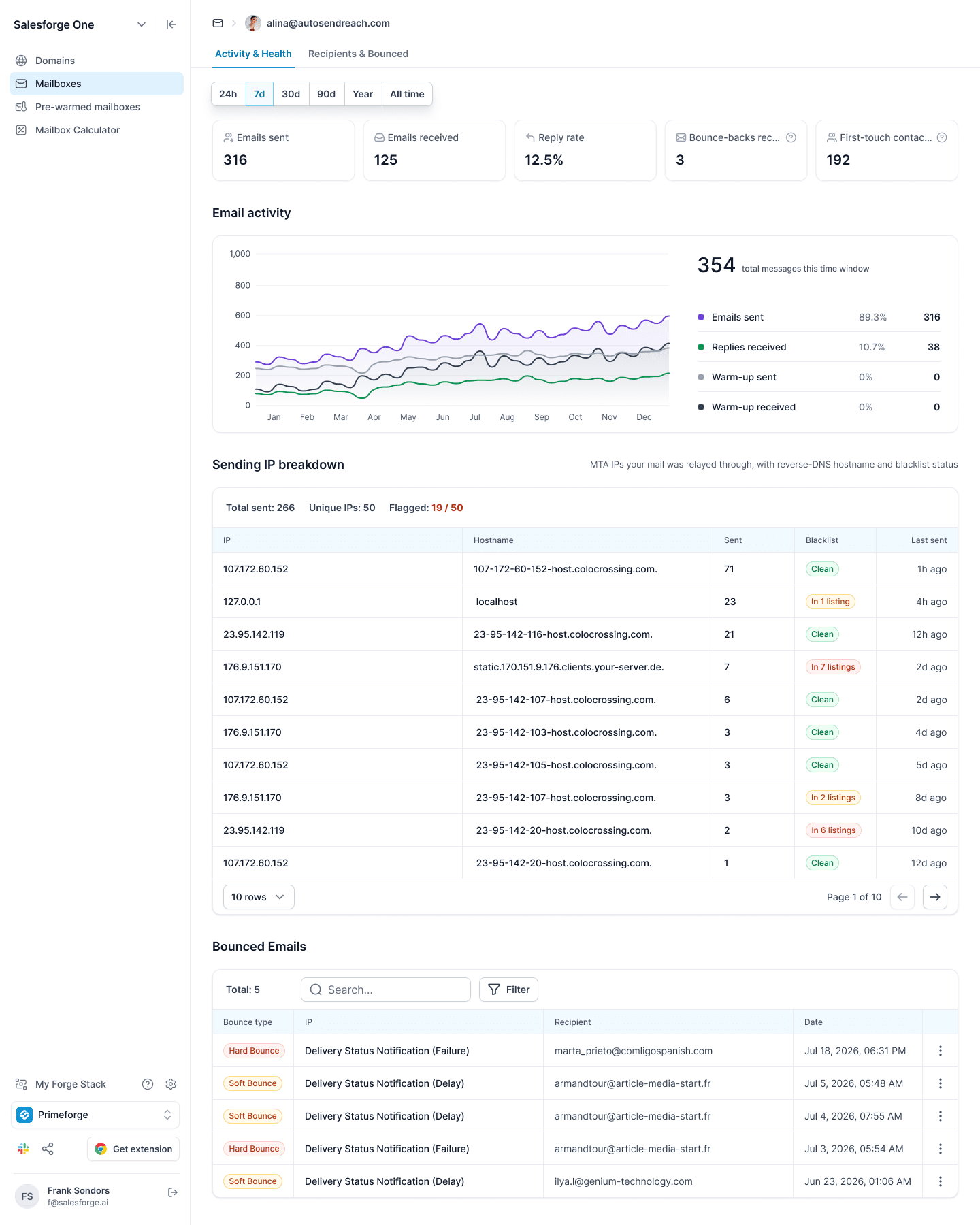
We’ve released Mailbox Analytics in Primeforge, giving you a detailed view of mailbox performance, sending health, bounces, and recipient activity directly inside Primeforge.
What’s new
Open any mailbox to access two new analytics views:
Activity & Health
Emails sent
Emails received
Reply rate
Bounce-backs received
First-touch contacts
Email activity over time, including sent emails, replies, and warm-up activity
Sending IP breakdown with hostname, sending volume, blacklist status, and last activity
Bounced Emails with hard/soft bounce classification, search, and filtering
Open any bounce to see detailed delivery information, including the cause, enhanced status, reporting MTA, message ID, and original DSN response
Recipients & Bounced
Unique recipients
Sends to prospects
Average sends per prospect
Top-domain share
Breakdown of your prospects by email provider/ESP, including Microsoft 365, Google Workspace, consumer providers, and self-hosted mail servers
Reply rates by provider
Most contacted recipients
Top recipient domains
You can also switch between 24h, 7d, 30d, 90d, Year, and All time to analyze mailbox performance across different periods.
This gives you a much clearer picture of how each mailbox is being used, who you’re sending to, where mail is being routed, and where deliverability issues are happening!
Salesforge 
1. Multichannel Webhooks
We've expanded Multichannel webhooks to cover more LinkedIn actions.
New webhook triggers are now available for:
LinkedIn message sent
LinkedIn InMail sent
LinkedIn connection request sent
LinkedIn connection request accepted
LinkedIn connection request withdrawn
LinkedIn profile viewed
LinkedIn post liked
LinkedIn contact followed
LinkedIn replied: covering replies to InMails, messages, and connection requests
Users can now create and access these webhooks programmatically and connect Multichannel activity with their own systems and workflows!
Leadsforge 
1. Enrichment History in Leadsforge
We’ve released a new Enrichment History breakdown in Leadsforge, giving you clearer visibility into how enrichment credits are being used across your lists.
Previously, the Enriched view only showed cumulative totals. Now, every enrichment is stored as a separate run, so you can see exactly what happened each time.
For each enrichment run, you can now see:
Who started the enrichment
When it was run
Status of the run
Contacts processed
Enrichment channels used
Credits consumed
Multiple enrichment runs on the same list are kept separately, with the newest shown first, while the list-level summary shows total runs, total credits used, and the latest enrichment activity.
We’ve also improved transparency around re-enrichment: if a contact already has the requested data, it’s skipped and you won’t be charged for it again.
We're still working on more features & workflow improvements across all forges in August! 