Changelogs
Stay up to date with the latest changes and enhancements.
Stay up to date with the latest changes and enhancements.

14. Jul 2026
Share
Salesforge 
1. Improved Lead Progress Visibility
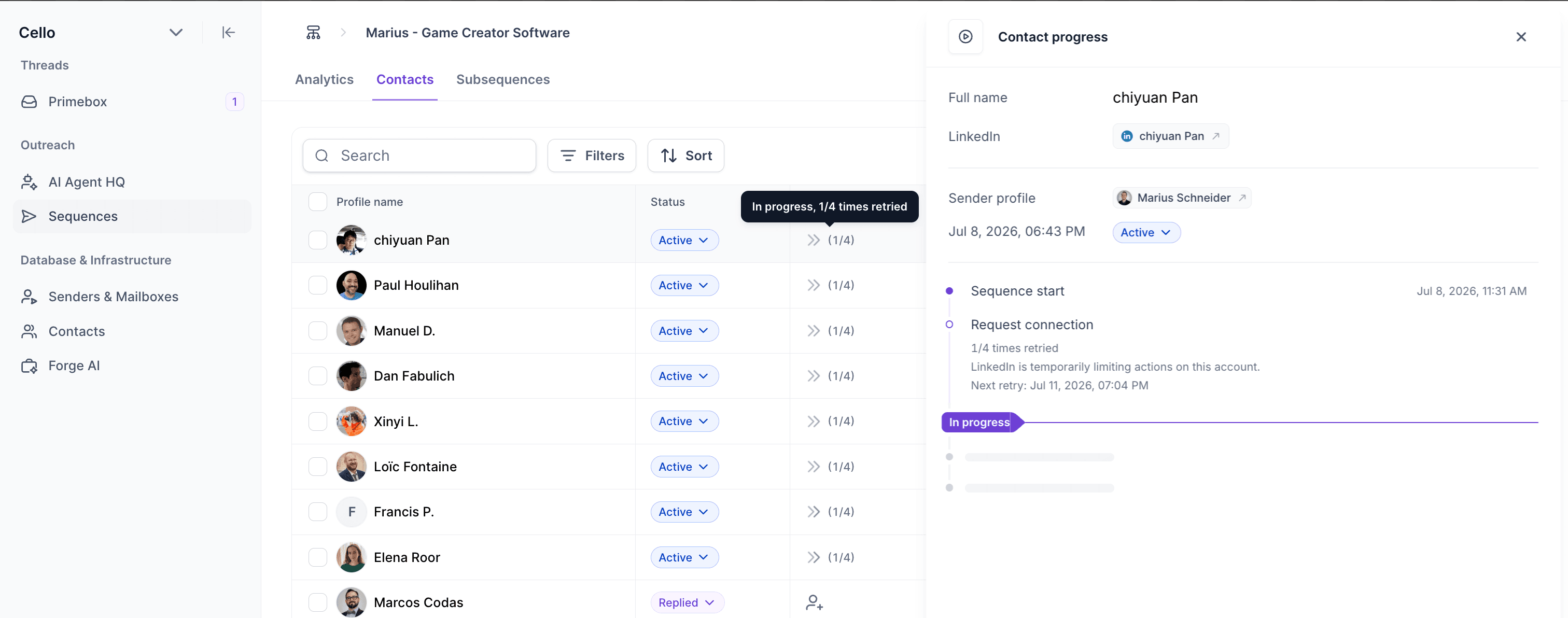
We've improved Lead Progress in Multichannel Sequences to give you better insight into what each contact is doing and when issues occur.
What's New
Retry status is now displayed in both the Contacts table and the Lead Progress modal, making it clear when a step is being automatically retried due to temporary issues (such as LinkedIn rate limits or email provider outages).
The current step is now highlighted in the Lead Progress modal, so you can instantly see where a contact is in the sequence.
If a step fails, the failed node is shown directly in the Lead Progress modal, making troubleshooting much easier.
2. Email Validation Status Condition for Multichannel Sequences
We've added a new Email Validation Status condition to the Multichannel Sequence builder, allowing you to route contacts based on the quality of their email addresses. To use this condition, simply add it to your sequence and run email validation when adding contacts to the sequence.
By default, the following statuses are considered valid:
Safe
Catch-all
Role account
How it works:
If a contact's email validation status matches one of the selected statuses, they follow the Yes branch.
If it doesn't match or if the contact has not been validated they automatically follow the No branch.
Primeforge 
1. Email forwarding for MS365 mailboxes.
Forwarding is now available for MS365 mailboxes just like for Google ones
Agent Frank 
1. Leadsforge-Powered ICP Setup for Agent Frank
We've redesigned the Targeting step in Agent Frank onboarding by bringing the Leadsforge search experience directly into the ICP setup.
You can now:
Browse potential leads using the familiar Leadsforge interface with filters and a searchable results table
Open LinkedIn profiles directly from the results
Expand your search to discover more matching leads
Remove leads you don't want to target, deleted leads are automatically added to your Do Not Search list in Leadsforge, preventing them from appearing in future enrichment searches.
Chrome Extension 
1. Chrome Extension Now Uses the Full-Height Side Panel
We've redesigned the Salesforge Chrome Extension to take advantage of Chrome's native Side Panel, providing a larger, more responsive workspace.
We're still working on more features & workflow improvements across all forges in July! 