Changelogs
Stay up to date with the latest changes and enhancements.
Stay up to date with the latest changes and enhancements.

05. Oct 2026
Share
Agent Frank 
1. Reporting for Agent Frank Sequences
You can now download reports for sequences run by Agent Frank, the same way you already can for regular Multichannel sequences.
How it works:
Open any Agent Frank sequence and use the reporting option to export its data as CSV
The export works the same as regular Multichannel sequence reports, so the files match what your team already uses
2. Active Contacts Allocation per Agent in Agent Frank
You can now decide how many active contacts each Agent Frank agent gets from your subscription. Now you control the split across all your agents and can move capacity to the plays that matter most.
How it works:
Set it at creation: on the Channels step, choose how many active contacts the new agent can use. It defaults to whatever quota you have free
Rebalance anytime: from AI Agent HQ, open Distribute active contacts to see every agent's allocation and adjust them side by side.
New allocation column: in the agents table, so the split is visible at a glance
Allocate in steps of 100: (minimum 100), using the slider or by typing a number
Sender checks built in:
If an agent's allocation needs more senders than it has, the row is flagged with exactly what to add, e.g. "Add 2 mailboxes and 1 LinkedIn account, or lower this allocation"
Teams & permissions:
Admins see and edit agents across all workspaces
Other users can edit agents in their own workspaces. Other workspaces show up as one read-only total
Agents that are currently enrolling contacts are temporarily locked
You can now run several agents in parallel and make sure the most important plays get the capacity they need!
Salesforge 
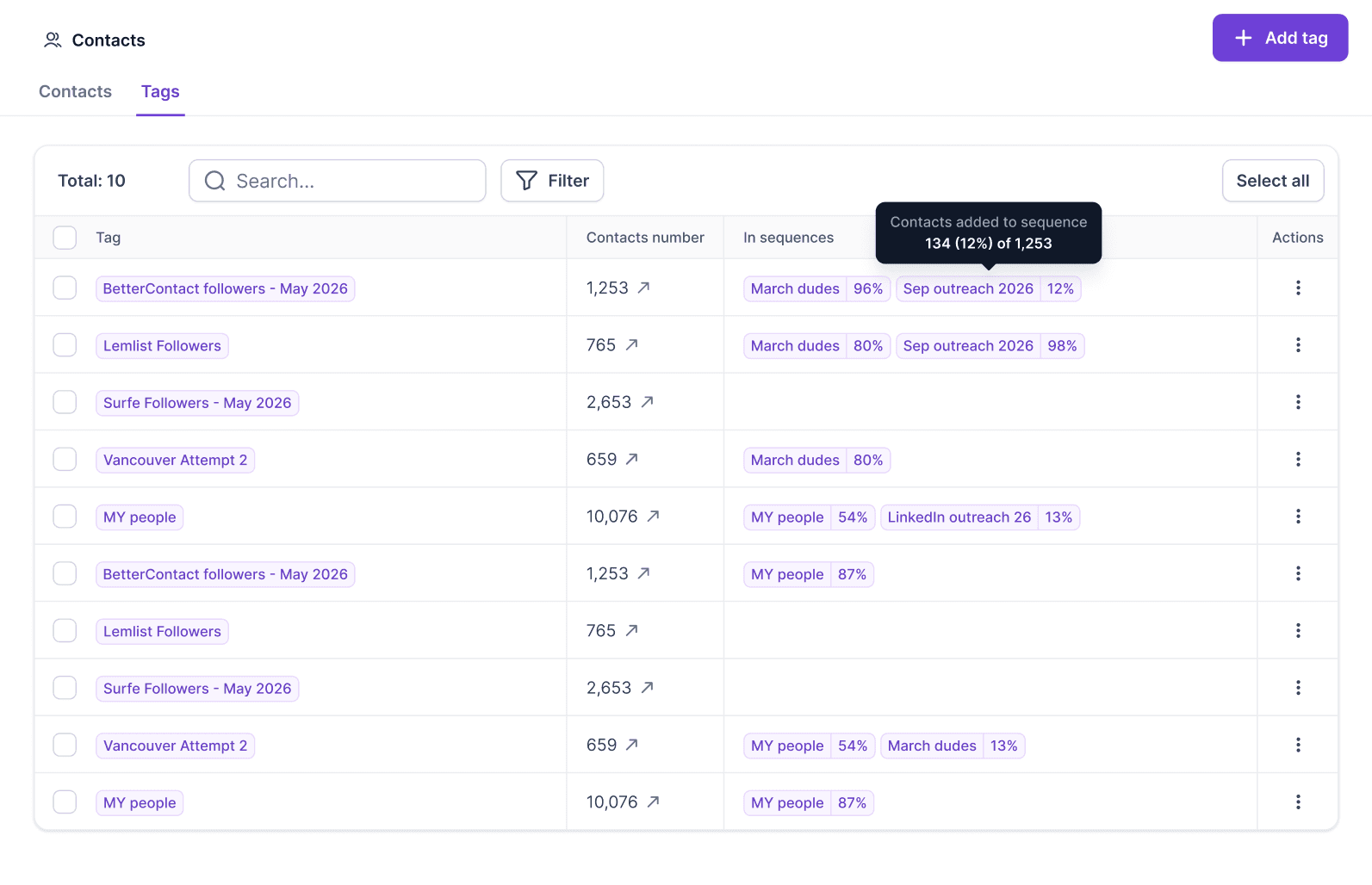
1. Tags Overview in Salesforge Contacts
The Contacts page has a new Tags tab. You can see every tag in your workspace in one place, along with how many contacts it has and which sequences it's used in.
This was a frequent request: customers wanted to tell at a glance which lists were already running in a campaign and which were newly added and still needed one.
What you'll see in the Tags table:
Tag name
Contacts: how many contacts carry the tag
Sequences: every sequence the tag's contacts are enrolled in, with the share of the tag in each (e.g. "120 of 400 contacts")
Tags with no sequence are easy to spot, so you know which lists still need a campaign
What you can do:
Click a tag's contact count to jump to the Contacts tab with that tag's filter applied
Edit or delete tags directly from the table
Select multiple tags, or use Select all, to bulk delete. Tags that still have contacts assigned are protected from deletion
Search tags by name
Filters:
Sequence: include or exclude specific sequences, or show only tags in No sequence
Contacts number: more than or less than a set amount
2. Primebox Redesign
Primebox has a fresh new look. We rebuilt the inbox so conversations are easier to read, faster to scan and quicker to reply to.
What's new:
Chat-style threads: messages now show as conversation bubbles, so back-and-forth with a lead reads naturally, whether it's email or LinkedIn
Reply from any message: reply straight from a message bubble, pick which sender to reply from, or forward emails
Filter inside a thread: in multichannel conversations, narrow a thread down by sender or by channel
Clearer context: each outbound message shows which sequence it came from, so you know what the lead is replying to
Cleaner inbox view: refreshed styling, fonts, labels and AI agent icons, with unread messages clearly marked
Smoother navigation: threads open at the latest message, and you can switch between threads or collapse back to the inbox without losing your place
Everything you already use is still there: labels, search, keyboard shortcuts, AI conversations and response rating, mark unread, delete and add to DNC.
Managing replies across your sequences should now feel faster and much easier on the eyes!
3. Easier Gmail Connection for Primary Domains in Salesforge
You can now connect Gmail mailboxes hosted on your primary domain with a simple Google login. There's no Admin console setup, and the mailbox isn't automatically added to warmup. When you add a Google mailbox, you now choose between two options:
Google Workspace / Gmail (Primary domain)
Sign in with Google, allow the requested permissions, and you're connected
No Google Admin console setup needed. The connection goes through a Google-verified app
The mailbox is not added to Warmforge, so your main business inbox isn't used for warmup
Google Workspace (Secondary domain)
Same flow as before, including the Admin console steps
The mailbox is added to Warmforge with warmup, as it is today
Best for dedicated cold outreach domains
Both options work fully in Salesforge: sending from sequences, replies in Primebox, open and click tracking, sentiment labeling, OOO detection and bounce protection.
Using your primary inbox for outreach is now quicker and easier to set up!
4. ESP Matching in the Salesforge Public API
ESP matching via API
You can now turn it on or off per sequence:
GET /multichannel/workspaces/{workspaceID}/sequences/{sequenceID}/settings
PATCH /multichannel/workspaces/{workspaceID}/sequences/{sequenceID}/settings with espMatchingEnabled: true
Set sequence settings when you create or update a sequencePOST /sequences and PATCH /sequences/{sequenceID} now accept a settings block. Configure everything in one call:
ESP matching
Bounce shield
Open tracking and plain-text emails
CC/BCC
Opt-out text and link
Opportunity tracking and opportunity value
Good to know
All sequence responses (GET /sequences and GET /sequences/{sequenceID}) now include the settings block too.
Updates are all-or-nothing: if any setting is invalid, the whole request is rejected with a 400 and nothing is saved
trackOpportunitiesEnabled, opportunitiesValue, companyOutreachLimitEnabled, companyOutreachLimitCount and sequentialCompanySendingEnabled still work at the top level, but they're now deprecated. Please switch to settings.<field>
We're still working on more features & workflow improvements across all forges in October!